Image gallery module details
The Image Gallery module allows users to browse a collection of images from a remote API and insert them into the editor. It also supports searching and direct image uploading within the same interface.
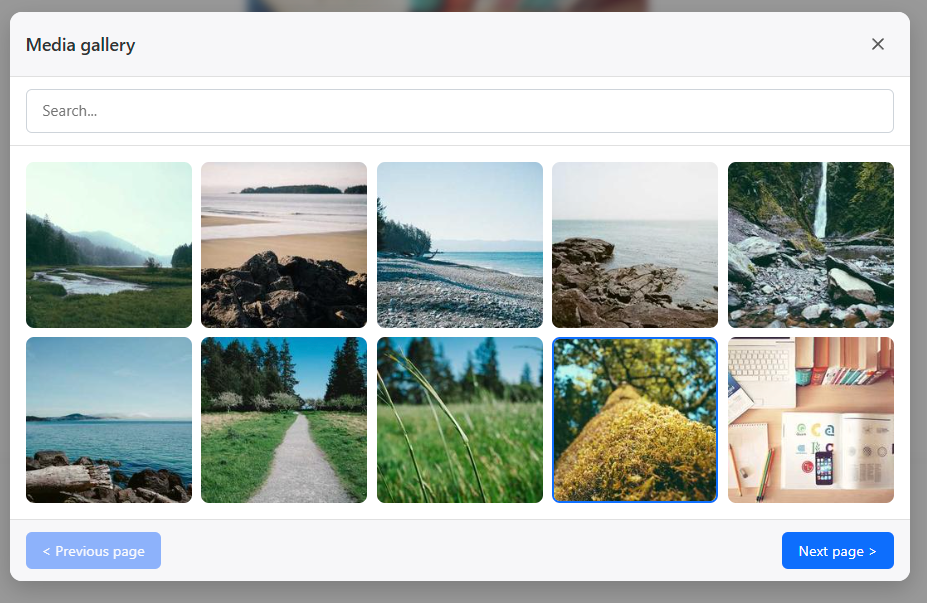
Mandatory Configuration
Activating the ImageGalleryField in your quill_options is not enough. You must also configure the ImageGalleryModule in your modules list with at least the listEndpoint option, otherwise the gallery will not be able to fetch or display any images.
Configuration
The following options can be passed to the ImageGalleryModule constructor in PHP:
Endpoints
- listEndpoint (string, mandatory): The API endpoint to fetch the list of images.
- searchEndpoint (string, optional): The API endpoint for searching images. If provided, a search bar will appear in the modal.
- uploadEndpoint (string, optional): The API endpoint for uploading new images. If provided, an "Upload" button will appear. By default, it inherits from the global
upload_handlerinquill_extra_options.
Labels & Messages
Use these options to translate or customize the gallery UI:
- buttonTitle (string): Tooltip for the toolbar button. (Default: "Open the media gallery")
- uploadTitle (string): Label for the upload button. (Default: "⬆️ Upload")
- messageTitleOption (string): Modal title. (Default: "Media gallery")
- messageLoadingOption (string): Text shown while loading images. (Default: "Loading...")
- messageNoImageOption (string): Text shown when no images are found. (Default: "No image")
- messageErrorOption (string): Text shown on API failure. (Default: "Error")
- messageSearchPlaceholderOption (string): Search input placeholder. (Default: "Search...")
- messageNextPageOption (string): Next page button text. (Default: "Next page >")
- messagePrevPageOption (string): Previous page button text. (Default: "< Previous page")
- messageCloseOption (string): Close button tooltip. (Default: "Close")
Behavior & Style
- icon (string): SVG icon for the toolbar button.
- uploadStrategy (string): 'form' (default) or 'json'.
- authConfig (array): Authentication headers/config for upload requests.
- jsonResponseFilePath (string): Path to the image URL in the JSON response after an upload.
API Interaction
Response Format
Your listEndpoint and searchEndpoint must return a JSON response with the following structure:
{
   "data": [
      {
         "url": "https://example.com/images/1.jpg",
         "thumbnail": "https://example.com/thumbnails/1.jpg",
         "title": "Beautiful Landscape"
      },
      {
         "url": "https://example.com/images/2.jpg",
         "title": "Portrait without thumbnail"
      }
   ],
   "links": {
      "next": "/api/media/list?page=2",
      "prev": null
   }
}- url: The full URL of the image to insert into Quill.
- thumbnail (optional): The URL shown in the gallery grid. If omitted,
urlis used. - title (optional): The
alttext for the image. - links.next/prev: Full URLs (including current search terms) to handle pagination.
Search Implementation
When a user types in the search bar, the gallery waits for 300ms (debounce) before sending a request to searchEndpoint. The search term is passed as a query parameter named term: GET /your-search-endpoint?term=my-search-query
Events
The Image Gallery module dispatches CustomEvents on the Quill container, allowing you to hook into its lifecycle:
quill:gallery:open: Fired when the modal opens.quill:gallery:close: Fired when the modal closes.quill:gallery:upload-success: Fired after a successful upload. Contains{ response, file }indetail.quill:gallery:image-inserted: Fired when an image is selected. Contains{ image }(the original data object) indetail.
Example of listening to events:
document.querySelector('.ql-container').addEventListener('quill:gallery:image-inserted', (e) => {
    console.log('Image selected:', e.detail.image);
});
Customization (CSS)
You can override the following CSS classes to match your application's design:
.quill-media-modal: The backdrop container..quill-media-window: The main modal container..quill-media-header: The modal header..quill-media-search: The search bar container..quill-media-grid: The container for image items (uses CSS Grid)..quill-media-item: Individual image items in the grid..quill-media-footer: The modal footer (pagination & upload).
Example of usage
use Ehyiah\QuillJsBundle\DTO\Fields\InlineField\ImageGalleryField;
use Ehyiah\QuillJsBundle\DTO\Modules\ImageGalleryModule;
use Ehyiah\QuillJsBundle\Form\QuillType;

$builder->add('content', QuillType::class, [
    'quill_options' => [
        ['bold', 'italic'],
        [new ImageGalleryField()], // Position the button in the toolbar
    ],
    'modules' => [
        new ImageGalleryModule(options: [
            'listEndpoint' => '/api/media/list',
            'searchEndpoint' => '/api/media/search',
            'buttonTitle' => 'Browse Media Library',
            'messageTitleOption' => 'Select an image for your article',
        ]),
    ],
]);
Try it live
Example of a listing API endpoint (Symfony)
Below is a full example of a Symfony controller that implements both the listing (with pagination) and search functionality required by the gallery module.
<?php

namespace App\Controller;

use Symfony\Bundle\FrameworkBundle\Controller\AbstractController;
use Symfony\Component\HttpFoundation\JsonResponse;
use Symfony\Component\HttpFoundation\Request;
use Symfony\Component\Routing\Annotation\Route;

#[Route('/api/media/gallery', name: 'api_media_')]
class GalleryController extends AbstractController
{
    #[Route('/list', name: 'api_media_list')]
    public function list(Request $request): JsonResponse
    {
        $page = (int) $request->get('page', 1);
        $perPage = 10;
        $total = 30; // Total images in your database

        $images = [];
        for ($i = 0; $i < $perPage; $i++) {
            $id = (($page - 1) * $perPage) + $i + 1;
            if ($id > $total) break;

            $images[] = [
                'url' => sprintf('https://picsum.photos/id/%d/400/400', 10 + $id),
                'thumbnail' => sprintf('https://picsum.photos/id/%d/200/200', 10 + $id),
                'title' => "Image #$id",
            ];
        }

        $baseUrl = '/api/media/gallery/list';
        $hasNext = ($page * $perPage) < $total;
        $hasPrev = $page > 1;

        return new JsonResponse([
            'data' => $images,
            'links' => [
                'next' => $hasNext ? "$baseUrl?page=" . ($page + 1) : null,
                'prev' => $hasPrev ? "$baseUrl?page=" . ($page - 1) : null,
            ],
        ]);
    }

    #[Route('/search', name: 'api_media_search')]
    public function search(Request $request): JsonResponse
    {
        $term = $request->get('term', '');
        $page = (int) $request->get('page', 1);

        // In a real application, you would filter your query with $term
        // and return the appropriate paginated results.

        // Example with mock data:
        return $this->list($request);
    }
}