AutosaveModule
Auto-imported: NO (requires manual addition to the modules option)
This module prevents data loss by automatically saving the editor content to the browser's localStorage.
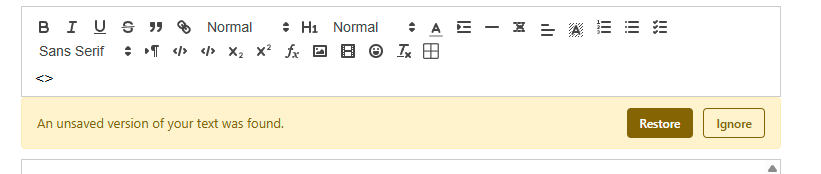
Options:
- interval: Time in milliseconds between saves (debounce). Default:
2000(2 seconds). - restore_type: How to restore data.
'manual'(default): Show a notification bar allowing the user to choose to restore or ignore.'auto': Automatically restore the content if the editor is empty.
- key_suffix: Optional string to append to the storage key to avoid collisions.
- notificationText: Text to display in the notification bar. Default:
'An unsaved version of your text was found.'. - restoreButtonLabel: Label for the restore button. Default:
'Restore'. - ignoreButtonLabel: Label for the ignore button. Default:
'Ignore'.
Behavior:
- Saving: Content is saved automatically after the user stops typing for the specified interval. The storage key is unique per page and per editor instance:
quill_autosave_{sanitized_path}_{editor_id}{key_suffix}. Only changes from the user source are saved (not initial hydration or API changes). - Restoration: On page load, if a saved version is found and differs from the current content, the module acts according to
restore_type. - Cleanup: The saved data is automatically cleared when the parent
<form>is submitted.
Manual Cleanup
If you are using a LiveComponent or a custom save mechanism that doesn't trigger the standard form submit event, you can manually clear the autosave cache by dispatching a global event:
javascript
window.dispatchEvent(new CustomEvent('quill:autosave:clear', {
    detail: { id: 'your_editor_id' } // ID of the editor container (optional)
}));
Usage example:
php
'modules' => [
    new AutosaveModule(options: [
        'interval' => 3000,
        'restore_type' => 'manual',
        'notificationText' => 'Un texte non enregistré a été trouvé.',
        'restoreButtonLabel' => 'Restaurer',
        'ignoreButtonLabel' => 'Ignorer',
    ]),
],